Notifications
Time zone for the morning mail, application updates, email summaries, and WhatsApp.
Notifications
Choose where MYO can reach you outside the app.
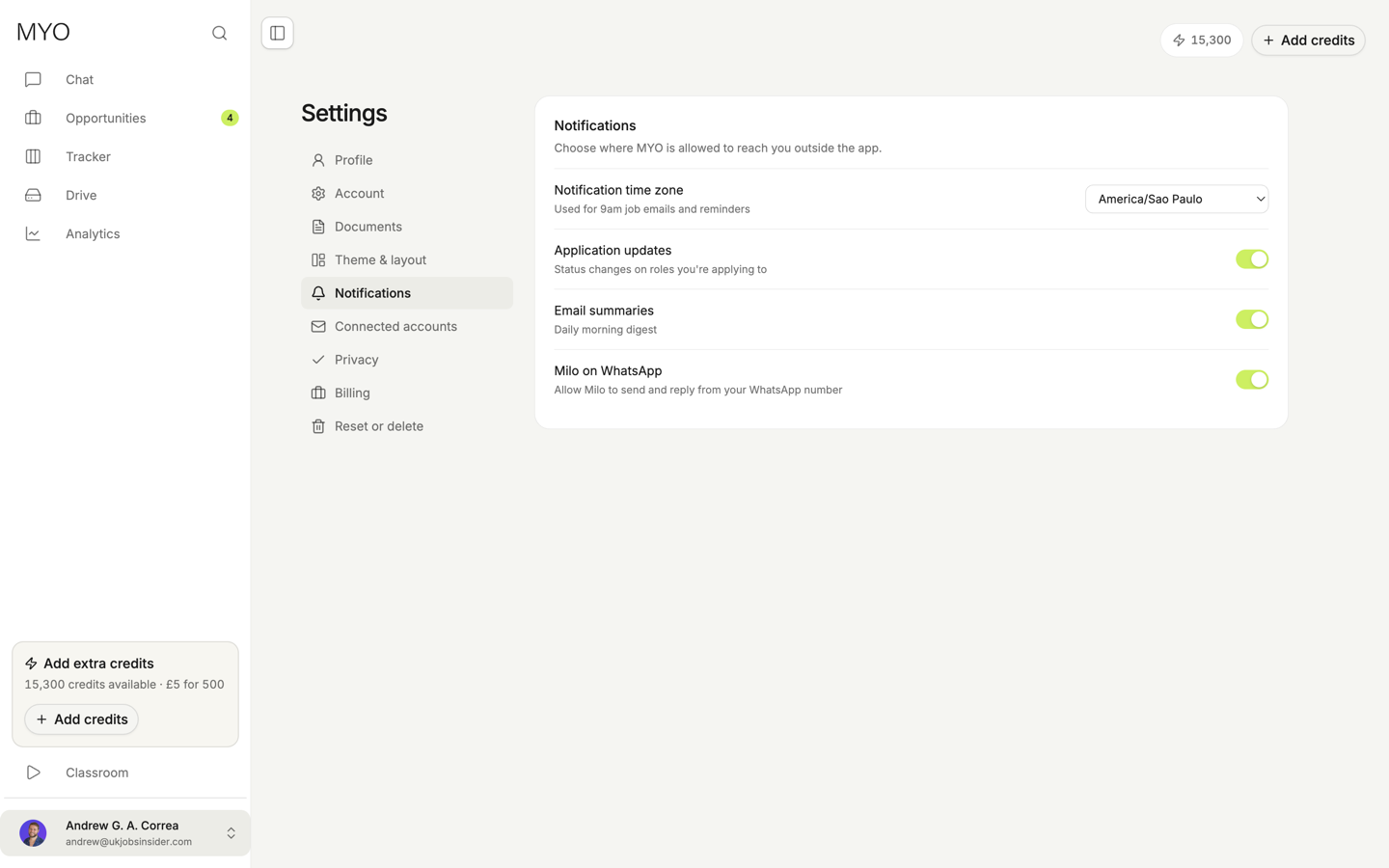
- Notification time zone. Used for 9am emails and reminders. Set it to your morning, not the server's.
- Application updates. Status changes on roles you are applying to.
- Email summaries. A daily morning digest.
- Milo on WhatsApp. Lets MYO send and receive messages through your connected WhatsApp number. Autopilot can use this channel to ask a missing application question so you can respond without opening the app. MYO still keeps the answer and application status in your workspace.
Use WhatsApp with Autopilot
- Save a WhatsApp number with its country code in Settings → Profile.
- Open Settings → Notifications.
- Turn on Milo on WhatsApp and Application updates.
- Send a short message from that number if MYO asks you to confirm the connection.
When an application cannot continue without a fact, MYO can send the question to WhatsApp. Reply to that message, then check Autopilot for the saved confirmation and the next application status. If the answer can be established from your confirmed profile, CV, application details, or a previous approved answer, MYO should reuse it instead of asking again.
For enabled Autopilot accounts, Milo groups questions, progress, and unsuccessful applications into a summary. You can select new recommended roles, answer several named questions, request prepared documents, and confirm a manual submission through WhatsApp or by replying to the summary email. New recommendations wait for your selection. Read the reply examples and manual confirmation steps.
Email summaries contain updates and document links. MYO does not automatically email a separate CV package for every application. Reply with the company, role, or application reference to request the files. Pausing and resuming does not repeat unchanged applications in the summary.
Milo follows the channel you are using for the conversation. Otherwise, Autopilot uses WhatsApp when enabled and uses email when WhatsApp is disabled or fails. It does not copy every WhatsApp update to email. A message that is queued or sent but unread is not treated as a delivery failure.
Use the same account for your applications and WhatsApp number. If you have multiple MYO logins, a number saved under one does not connect the others. Email replies must come from the address that received Milo's update. Connecting Gmail is not required to reply to that email, but it is still needed when an employer requires an email verification step or you want mailbox tracking.
Do not send passwords, government identifiers, payment information, or other protected details in chat or WhatsApp. Enter those in the secure form in Opportunities → Autopilot settings → Portal accounts when a supported application requires them.
WhatsApp is optional. The same pending question remains available on Home and in Opportunities → Needs attention. When an attempted WhatsApp delivery fails, a blocking question can fall back to your account email while Application updates are enabled, even if routine email summaries are off.
Low-credit reminders
If your shared AI credits are running low, MYO can email you a reminder with a link to application packs in Settings → Billing. The default is a balance of 50 credits or less, with at least seven days between reminders.
Reminders stop when your balance recovers. They are only sent to active members who have completed onboarding and have email enabled, and are skipped during the 24 hours before monthly renewal. You can also wait for your included allowance to refresh.
An optional £5 / $7 pack adds 40 applications and 500 supporting credits, and lifts the weekly application cap until renewal. Packs expire at that renewal. Read how packs and shared usage work.