
Opportunities
Review recommendations, start selected applications, and manage Autopilot work from Opportunities.
Opportunities
Opportunities brings Milo's recommendations and your unfinished Autopilot applications together. Each recommendation shows the role, company, source, and search match.
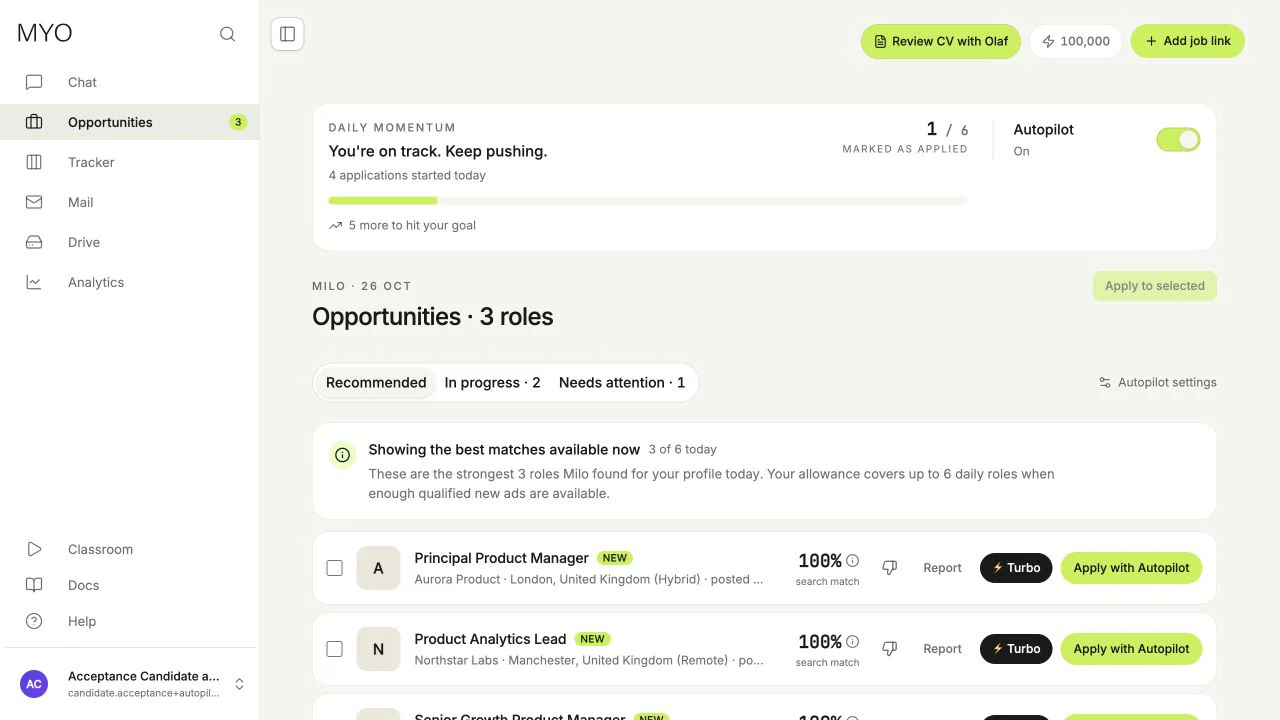
Work through your applications
For enabled pilot accounts, turn on Autopilot beside Daily momentum and complete its setup. Eligible applications already selected in your queue start preparation automatically. You do not need to open the document editor or download a CV.
- Recommended: review jobs and choose the ones you want.
- In progress: follow preparation, queued applications, and employer forms being processed.
- Needs attention: answer questions, fix missing sources, check uncertain submissions, or finish a blocked application manually.
- Autopilot settings: review Saved answers, Employer Q&A, Portal accounts, and Preferences.
Completed applications leave these ongoing views and remain in Tracker. Your existing Home cards, including your streak, remain available.
Follow the complete Autopilot setup and testing guide →
Daily room
The list is capped by plan, separate from credits:
| Plan | New roles a day |
|---|---|
| Standard | 5 |
| Pro | 8 |
| Max | 10 |
If fewer strong matches exist, Milo shows the ones that clear the bar and says so. Your tier can show up to the daily maximum when enough qualified ads are available.
What you can do on a row
Each row shows the company, the title, and why it fits.
- Open the description.
- Track the role, or dismiss it when it is the wrong lane.
- Select roles and choose Apply to selected with Autopilot on, or Start selected applications with it off.
- Apply with Autopilot on one row when enabled, or Start application when disabled. With Autopilot on, MYO follows your selected document policy and queues supported work. With it off, you can prepare documents and submit manually.
- Turbo on Pro and Max, for a stronger pass on that package. See Turbo.
- Add job link when the role is not in today's batch. Paste the listing URL and Olaf can prepare from it.
- Report a row that should not be in the list.
Home shows a shorter cut of the same day. View all opens this page.